
How to Select Your Role and Manage Work Easily with Shri Sunrise Solution
Shri Sunrise Solution provides a simple and organized system to help users manage their roles, tasks, employees, branches, and work activities efficiently.
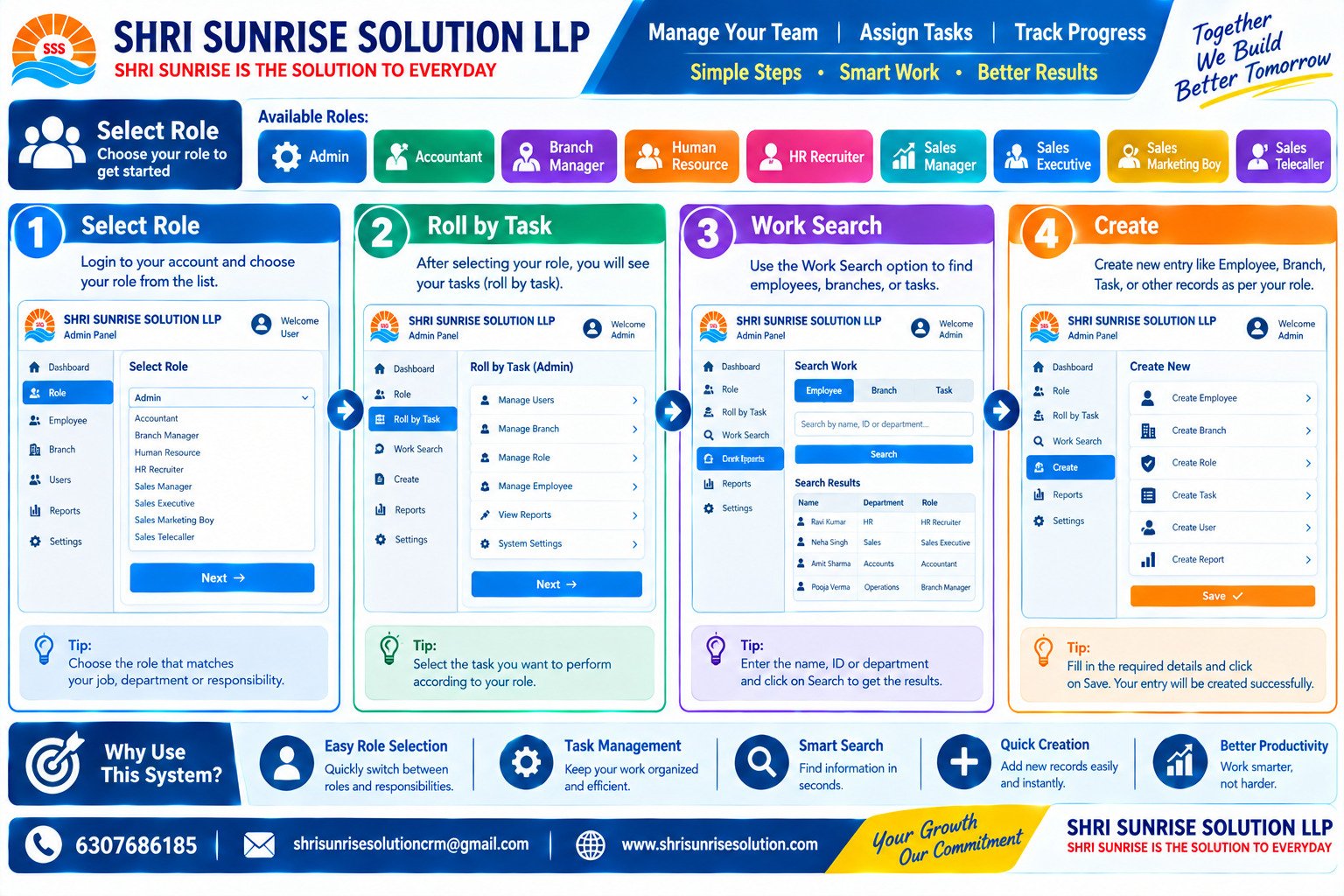
Our system makes it easy to select the appropriate role and access the responsibilities related to that role. Users can choose from different roles such as Admin, Accountant, Branch Manager, Human Resource, HR Recruiter, Sales Manager, Sales Executive, Sales Marketing Boy, and Sales Telecaller.
Simple Steps to Get Started
1. Select Role
Login to your account and select the role that matches your job, department, or responsibility.
2. Roll by Task
After selecting your role, view the tasks available for your position and choose the task you need to perform.
3. Work Search
Use the Work Search option to quickly find employees, branches, departments, or other required information.
4. Create Records
According to your role and permissions, you can create employees, branches, users, roles, tasks, reports, and other records.
Why Use This System?
Easy role selection
Organized task management
Quick work and employee search
Simple record creation
Better productivity and workflow management
Helps teams work smarter and more efficiently
Shri Sunrise Solution focuses on making everyday work simple, organized, and productive through smart management solutions.
Contact:
6307686185
shrisunrisesolutioncrm@gmail.com
www.shrisunrisesolution.com




Comments
No comments found.